Showing posts with label After Effects. Show all posts

Friday, October 24, 2014

Car Crashes and the Art of Green Screen

So we've got this car crash scene.

At first I was thinking of filming myself run through a red light in downtown Ithaca and see what happens, but as it turns out there are far safer and cost efficient ways to do this.

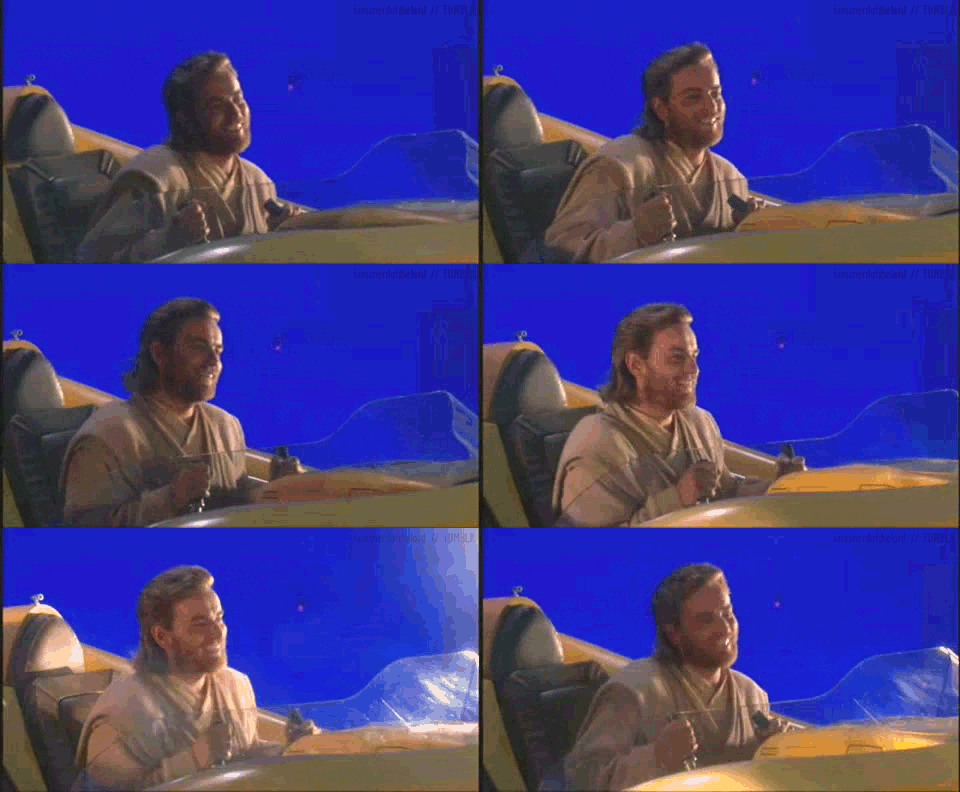
These days, you don't need to be a filmmaker to understand how a green screen works. You tell the computer to replace a certain color (in this case bright green) with another other image. The result is something like this:


Seems pretty basic. But it's time I admit the truth... I'm terrified of green screen shots. 

Why?

Call it a form of PTSD. Once upon a time I did some sub-par acting in a film that involved a car crash and the result was... less then optimal. 


To give the crew some credit, what they were trying to do was pretty complicated. Green screen shots for a moving vehicle involve light passing by from the streets, moving scenery in the background, and reflections off windows. That's a lot to think about and it's involves all three stages of production. Thankfully though, the internet has plenty of resources that list out the steps required to accomplish something like this. 

For work in postproduction, the best tutorial is by Video Copilot:


With these resources, I feel much more optimistic and prepared for this undertaking. It can be complicated, but if all steps are followed to a tee then the process should be painless. Now I just need to convince Mr. "Editing for Dummies". 


"There's a Man in the Woods" - Short Animated Film


"There's a Man in the Woods" is a short film created by Jacob Streilein from the California Institute of Arts in the Character Animation Program. This is what Jacob says about his short animation: 

"When I was in elementary school, the older kids started a rumor that quickly made recess a terrifying experience. I've been wanting to make this film just so I had a place to put some of the details of that rumor. I animated this in flash, and did my backgrounds in photoshop. After Effects for compositing, and Protools for sound. Thanks to Michael Paul Kennedy for the wonderful music ( mkennedymusic.com ), and Michael Ho for the voice work ( michael-ho.net/ ). Watch other films made by my classmates: vimeo.com/channels/calartscharanimfilms2014"


This was Jacob Streilein's final film at CalArts. It is written like a poem and told from the teacher's perspective. The writing is beautiful and intriguing. The story is almost like a take on Aesop's "The Boy Who Cried Wolf." Seemingly simple at first, the plot turns into a dark whirlwind until the teacher's life spirals out of control. The first time I watched it (because I've now watched it several times), I had tears in my eyes and goosebumps all over my body.

The color helps the audience understand the order of the story. The visuals are dark green and yellow when it is current time, and very vibrant greens and purples for the flashbacks. The animation itself is very fluid and aesthetically pleasing. The sound and music fit perfectly, with creepy/suspenseful sounds creating the bone-chilling atmosphere.

After the four minutes were over, I felt so moved that I wanted more!

You really need to see this:


There's a Man in the Woods from Jacob Streilein on Vimeo.

Thursday, October 9, 2014

Blurring Logos in After Effects

For the past two years I have been blurring logos for “Company X” (A well known company I won't mention). At first I blurred them using Motion but after Final Cut X came out, they did the big switch to Adobe so I had to figure out the best way to do it in After Effects. I have been blurring for about 5 hours straight today so I figured I would take a break and write about it because my eyes are actually going blurry.

I feel like there is a much easier way of blurring these logos using a different technique or software like DaVinci but as of now I have to do it the long and monotonous way. In case you were itching to know... this is my everyday process:
  • Company X sends me footage using a highly secure transfer software.
  • I download it and bring it into After Effects. 
  • Sometimes they send me an e-mail with notes and time code for each package which I refer to throughout the process. 
  •  I play through the layer of video once and then start at the beginning. 
  • When I find the first logo I need to blur I create an adjustment layer. I set in and out points for that layer/logo. 
  • Then I create a mask covering the logo. 
  • The next step is adding the blur. The blur I use is called “fast blur” and I also add some feathering so the blur better blends with the surrounding area.
  • The intensity of the blur depends on the size and clarity of the logo. 
  •  Now frame by frame I move the mask to follow the logo using key frames.
  • However,  if an important character moves a part of their body partially in front of the blurred mask I have to create a subtraction mask. AKA my WORST nightmare. Not really but it’s just an extra step.
  •        In order to create a subtraction mask I duplicate the original video layer and drag it on top of the blurred layer. I create a mask around the character’s obstructing part in the duplicate video layer. 
  • I follow that object using key frames until it cuts to the next shot or the character stops obstructing the blurred mask.
  •         And then I repeat these steps for the remainder of the package.

          A final blurred shot looks a little like this….. (but with Company X's footage)


           A typical package has 40 adjustment layers instead of 7 but you get the idea. I know I could potentially use motion tracking with this but I found that when you have footage that whips/pans very quickly and the logos aren’t clearly defined, motion tracking takes longer than just doing it by hand. So I hope you enjoyed this extremely boring blog post as much as I did. Now back to blurring I go!


Thursday, November 24, 2011

Unique Filming Technique

I found The Other Guys on TV the other night and it was at the scene when they are in the bar. It's very interesting how they did it. Take a look:


Anyway, I was curious how this was done and did some research. It can be easy to 3D model and animate this entire thing but everything looks too real to be created in Maya, 3D Studio Max, Cinema 4D, or Lightwave. These were actually shot in real life.

Another film showed how to do this.


Basically, this was shot twice. Once with not actors and the crane goes through the scene with computed pans and tilts to get the correct frame, then it does the same exact sequence with the same timing with the actors. Later on in the "postproduction" phase, they added in glass, explosions, dollar bills, etc. The same goes for The Other Guys but that had to of been more than two takes because Mark Walberg and Will Ferrel show up multiple times.

Very interesting